Scroll-driven 3D without wrecking your page
We put a single continuous 3D world behind 14,000 pixels of marketing copy and kept the homepage at 144 kB. Here is the architecture, the maths, and the four bugs that cost us the most time.
In short

- One scroll owner, sampled once per rendered frame, beats several throttled listeners that disagree with each other.
- Map scroll to camera travel with a sine-corrected ramp so speed is continuous across section boundaries with no blending code.
- In a near-black scene the only thing worth reflecting is the light itself, which costs one sprite instead of a second render pass.
- Reduced motion should remove the motion the user did not ask for, not ship them a different, deader page.

Most agency sites that use 3D use it once, in the hero, and then abandon it. We wanted the opposite: one continuous world that the entire page travels through, with the copy laid over it. This is what that took, including the parts that went wrong.
The constraint that shaped every decision: the copy is the product. A marketing page exists to be read, so the 3D can never win an argument with the text. That rules out most of what makes 3D showreels impressive and leaves a narrower, more interesting problem.
One owner for scroll
The first version had four separate places computing the camera's position from scrollTop, plus two scroll listeners racing each other on the same element. They disagreed by about a fifth of a second, which is invisible in a screenshot and very visible when scenery pops.
Everything now reads from one module. The important detail is that it is sampled once per rendered frame from inside the render loop, not from a rAF-throttled scroll listener:
export function sample() {
  const el = document.getElementById('container')
  if (!el) return
  const max = el.scrollHeight - el.clientHeight
  if (Math.abs(max - lastMax) > 2) measure()
  const p = max > 0 ? clamp01(el.scrollTop / max) : 0
  const now = performance.now()
  world.v = (p - world.p) / Math.max(now - lastTime, 1)
  world.p = p
  lastTime = now
  world.targetZ = travel(p)
}Pacing: the maths that makes it feel authored
A linear mapping from scroll to camera position is the obvious thing and it feels like a conveyor belt. What you want is for the camera to surge between sections and settle while someone is reading.
We collapsed fourteen DOM sections into six chapters, and inside each chapter the camera runs a sine-corrected ramp:
// t is local progress inside a chapter, a is how hard it holds in the middle
const eased = t + (a * Math.sin(TAU * t)) / TAU
const rate  = 1 + a * Math.cos(TAU * t)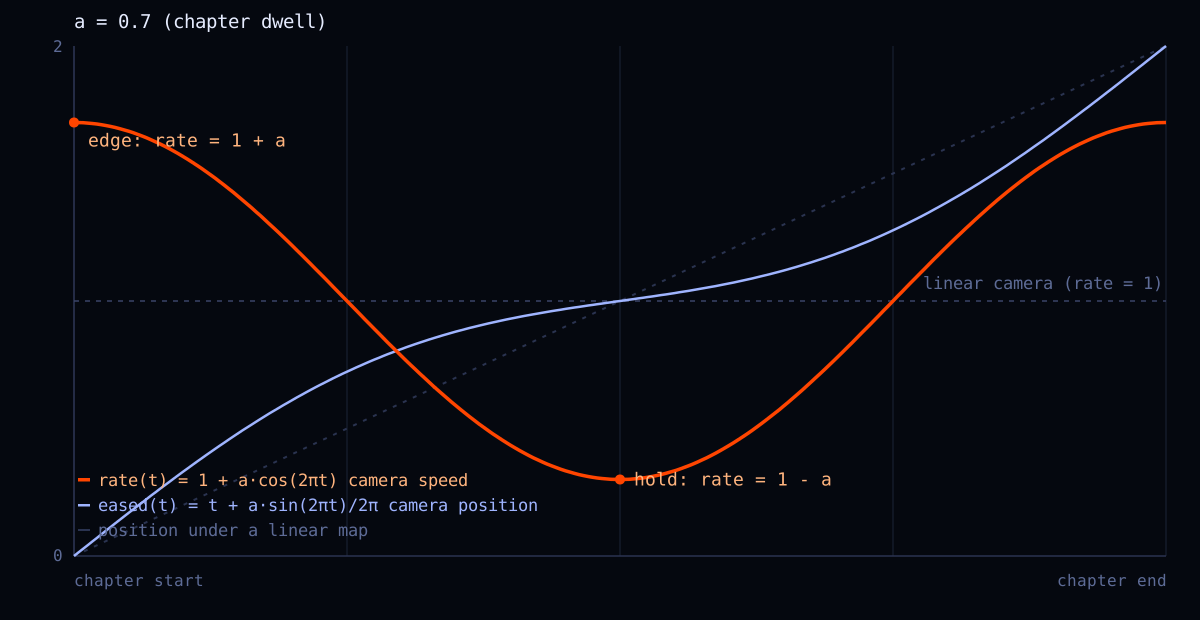
Three properties make this worth the two lines. The derivative is 1 + a at both edges and 1 - a at the centre, so fast meets fast at every boundary and velocity is continuous with no blending code. It is monotonic for a of 1 or less, so the camera can never walk backwards. And at a = 0 it collapses to the identity.
Measured on the running page, travel is monotonic across all 1,000 sampled steps, totals exactly 170 world units, and ranges from 25 units per unit of progress at the slowest hold to 316 at the fastest surge. Against a flat 170 before.
Chapter boundaries come from the DOM
Hardcoding the scroll fractions where each section starts is tempting and wrong: they move when content is added, when the viewport changes, and when a font finally loads. We measure them instead, with the hardcoded values kept only as a fallback.
for (const chapter of CHAPTERS) {
  const node = chapter.anchor ? el.querySelector(chapter.anchor) : null
  chapter.rawStart = node
    ? (node.offsetTop - vh * 0.6) / max
    : chapter.fallbackStart
}

// force a contiguous monotonic partition of 0..1 so local progress
// is always defined and travelZ never needs a gap branch
next[0].startP = 0
for (let i = 1; i < next.length; i += 1) {
  next[i].startP = Math.min(
    Math.max(next[i].rawStart, next[i - 1].startP + 2e-3),
    1 - 2e-3,
  )
}The road is then renormalised so total travel is always exactly the same number of world units no matter how much content ships. That keeps the fog range, the far plane and both recycling spans tuned when someone adds a section.
Making a near-black scene look expensive
The scene is a night street. Everything in it is unlit MeshBasicMaterial, there is no shadow pass, and there is no postprocessing. That is a deliberate budget decision, and it means the usual tools for making 3D look costly are unavailable.
Three things bought most of the quality. Reflections without a reflection pass. A wet-street reflection is normally a second render of the scene from a mirrored camera. In a near-black set the only thing worth reflecting is the light itself, so every lantern smears down the street on one feathered additive sprite. It costs one draw call instead of doubling the scene.
Bloom without a bloom pass. Two additive sprites per light, one tight and one very wide and faint, read as bloom at a fraction of the cost of a real pass, and do not fight the tunnel-rat View setup that lets several 3D views share one canvas.
Silhouette over shading. The street lantern started as a sphere on a stick. It is the object on screen in every single frame, so it was worth turning on a lathe. The pinched ends and the swell through the belly are the whole silhouette, and a lathe buys them for the same cost as a sphere.
Getting it to read as lit rather than as a solid object took the skin, not the shape. A lathe maps v up the profile, so a vertical gradient lands exactly where it should:
function makeLanternSkin() {
  return canvasTexture(16, 128, (ctx, w, h) => {
    const g = ctx.createLinearGradient(0, 0, 0, h)
    g.addColorStop(0, '#4a2a12')     // pinched top, in shadow
    g.addColorStop(0.42, '#fff2d8')  // hot through the belly
    g.addColorStop(0.58, '#fff2d8')
    g.addColorStop(1, '#4a2a12')
    ctx.fillStyle = g
    ctx.fillRect(0, 0, w, h)
    ctx.fillStyle = 'rgba(90,45,15,0.30)'
    for (let y = 8; y < h; y += 9) ctx.fillRect(0, y, w, 1.5)  // ribs
  })
}Endless street, fixed cost
Scenery recycles. Each object keeps itself within one span ahead of the camera, so a street of any length costs a fixed number of objects:
function recycle(group, span, onChild) {
  const camZ = world.camZ
  for (const child of group.children) {
    const base = child.userData.base || 0
    const z = base + Math.floor((camZ - base - 4) / span) * span
    child.position.z = z
    if (onChild) onChild(child, z)
  }
}The one thing recycling costs you is landmarks. If everything loops, nothing is ever passed. So a handful of objects sit at absolute positions and are excluded, and recycled scenery is suppressed inside their footprint so nothing spawns through a gate.
Four bugs worth the retelling
1. A GLB node with a baked transform
We reused a pagoda from a GLB as the object at the end of the road. Its node carries a baked 0.01 scale and a 90-degree quaternion. Writing scale and rotation onto the clone, exactly as the surrounding code does for other objects, produces a 2,000-unit wall lying on its side.
// wrong: overwrites the baked transform
clone.scale.setScalar(5)
clone.rotation.set(0, 0, 0)

// right: never write to the node, wrap it
const holder = new THREE.Group()
holder.add(SkeletonUtils.clone(scene))
holder.scale.setScalar(fit)2. useAnimations mutates the object it gave you
drei's useAnimations fills the same actions object in a layout effect rather than replacing it. So a memo keyed on that object runs once, against an empty object, and never runs again:
// silently never re-runs: `actions` keeps its identity while being filled
const clips = useMemo(() => buildClips(actions), [actions])

// build lazily on the first frame the actions actually exist
const clipsRef = useRef(null)
const getClips = () => {
  if (clipsRef.current) return clipsRef.current
  if (!actions || !actions['run cycle'] || !root.current) return null
  clipsRef.current = buildClips(actions)
  return clipsRef.current
}3. Comparing against the wrong action object
Long clips get trimmed. A formal bow that runs nearly seven seconds becomes three with AnimationUtils.subclip. The trimmed clip is a different action object, so a finished handler that checks against the original name never fires, and the state machine stalls forever in the entrance.
const onFinished = (e) => {
  // compare against what is actually playing, not against a named clip
  if (current.current !== e.action) return
  if (entrance.current === 'bow') entrance.current = 'done'
  play('idle', { fade: 0.45 })
}4. Warped crossfades corrupt a loop
three's crossFadeFrom(prev, duration, warp) with warp set true time-warps both clips during the fade. If a fade is ever interrupted, the incoming action is left at a distorted timescale permanently. On a run cycle that is a permanently broken stride, and it looks like an animation export problem rather than a code problem.
Making a character read as a runner
The first version damped the character's position and his heading independently of the clip that was playing. Leaving his mark he glided sideways across the street while a run cycle played facing down it. He read as a dragged doll, because that is exactly what he was.
The rule that fixed it is short:
// the damps only ever move a TARGET he chases
easing.damp(w.position, 'x', tx, 0.35, d)
easing.damp(w.position, 'z', tz, 0.28, d)

// heading comes from the velocity the damps actually produced
const vx = (w.position.x - prev.x) / Math.max(d, 1e-4)
const vz = (w.position.z - prev.z) / Math.max(d, 1e-4)
const groundSpeed = Math.hypot(vx, vz)
const heading = moving ? Math.atan2(vx, vz) : idleFacing

// and the stride is matched to the ground he covers
const stride = Math.min(Math.max(groundSpeed / 6, 0.7), 1.9)Add hysteresis on the moving-or-still test so a jittery trackpad cannot flap the crossfade, and scope the stride multiplier to the run clip only, or a bow plays at 1.9x and looks possessed.
Keeping the copy legible
The world sits behind a fixed veil whose opacity is written per frame as a CSS custom property. No React involved, no transition to lag behind the scroll:
const ramp = clamp01((el.scrollTop - vh * 0.45) / (vh * 0.55))
world.scrim = ramp * chapter.scrim
document.documentElement.style.setProperty('--world-scrim', world.scrim.toFixed(3))Film grain and vignette are a CSS overlay with an inline SVG turbulence tile, over the world and under the copy. That keeps the renderer at a single pass and costs nothing per frame.
What it costs
The homepage is 144 kB of first-load JavaScript with the whole thing in it. There is no postprocessing library, no physics, and no new asset pipeline: every prop is procedural geometry merged per material, and every texture is drawn to a canvas at runtime. Mobile drops the object counts and keeps the same code path.
That number is the whole argument. A continuous 3D world is not automatically expensive. It is expensive if you reach for the tools that make 3D look expensive. Reach for cheaper ones that happen to suit a night scene and you can put a world behind an entire marketing site without asking the reader to pay for it.

The site you are reading this on is the one described here. Scroll the homepage and the street is the same street. Poke the ninja.